For coaches who run plans in a spreadsheet
From Excel, PDFs and Messenger to Airon
Airon is an app for personal trainers with an AI assistant. Each client's plan, chat and progress live in one place. The assistant proposes changes but saves nothing on its own.
- Free for up to 3 clients
- No card needed
- No trial deadline
How you work today, and with Airon
You do not have to change how you coach.
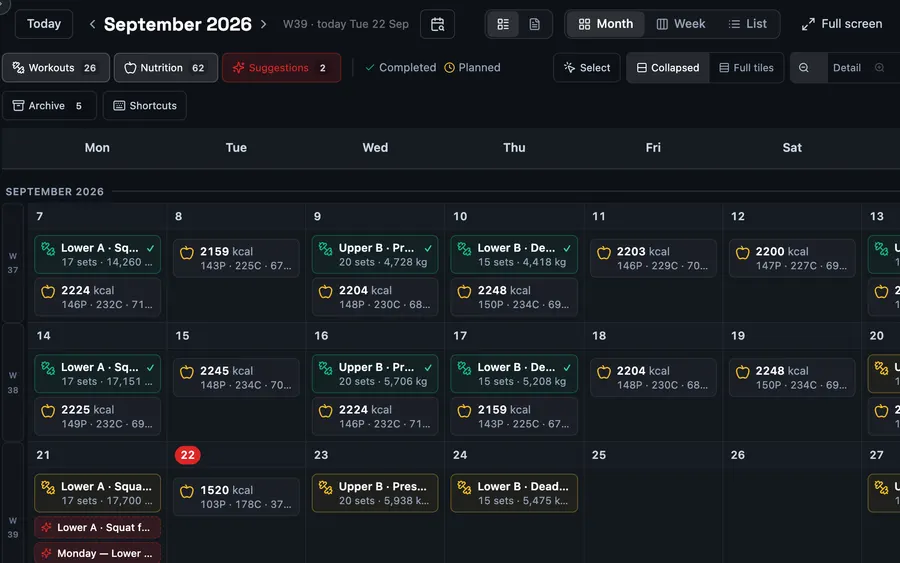
Switch in three steps
No onboarding project and no sales call. You start with one person.
Create an account and a team
You create a coach account and name your team. No payment details required.
Invite your first client
Send the team link or a personal invitation. Your client signs up in their phone's browser and agrees to share their data with you. Nothing to install.
Rebuild the plan as templates
Save each training day from your spreadsheet once as a template: exercises, sets, reps and loads. Then schedule it for your client over the coming weeks.
What moves from your spreadsheet, and what does not
We checked this against a typical coaching plan: weeks, days, sets × reps and loads.
A plan in Excel or Google Sheets
By hand, onceYou rebuild each training day as a template and schedule it for your client over the coming weeks.
CSV import
Into your own calendar onlyOn a computer, in Airon's column format. After import, you can save a session as a template for a client.
.xlsx and PDF files
Not importedYou rebuild a PDF plan as a template.
A client's training history
Yes, via CSVYour client uploads an export from another training app to their own account, on a computer. A few popular formats are recognised automatically.
Messenger and text conversations
Not movedYou agree on next steps in the chat next to the plan.
What Airon does not do yet
- Online payments for packages and bookings. They are in development; for now, you take payments the way you do today.
- Class timetables, memberships and access gates. That is a club system's job. Airon is for personal trainers, small studios and training groups today.
Free for up to 3 clients, then from $9.99
Paid plans raise the limits; they do not unlock the basics.
Free
$0 forever
- Up to 3 clients in total
- No card needed, no trial deadline
PRO
$9.99 a month
- Up to 10 clients in total
ELITE
$29.99 a month
- Up to 50 clients in total; bigger team? ELITE multiplies the limits (x2, x3 and up)
Final price, no extra charges. Your clients use Airon for free. Paying from Poland? 29.99 / 99.99 PLN a month.
Questions before you switch
Do I have to move all my clients at once?
No. Start with one person. The Free plan covers up to 3 clients, so you can keep coaching the rest the old way until you are ready.
Can I import a plan from Excel?
Not straight into a client's calendar. Today, CSV import works only into your own calendar, on a computer, in Airon's column format: one row per set, dates as YYYY-MM-DD, numbers with a decimal point, no commas inside text. An export from the same window is the template. Mark the plan as planned, or the sessions are saved as completed. A sheet laid out as week, day, sets × reps needs reshaping first. You can save an imported session as a template and schedule it for a client. We do not import .xlsx or PDF files.
Will the AI assistant change a client's plan on its own?
No. The assistant saves nothing on its own. Every change is a proposal that a person approves: you in your chat, your client in theirs.
Does my client need to install an app?
No. Everything works in the browser, on phones and computers. An Android app is available as well, in open testing. It makes logging a workout easier, but it is not required.
Do I need to provide card details?
No. A card is needed only when you choose a paid plan yourself.
Will I get a company invoice?
Not today. Payment goes through Stripe, which does not ask for a company tax number (NIP), so the payment document you receive does not carry your company's details and is not a Polish invoice issued through KSeF. Company invoices are planned, with no date. We will say so here when they are available.
Start with one client. For free.
Create an account, invite your first client and move one plan.